

Artificial intelligence has moved far beyond simple chat-bots. We will examine the best AI productivity tools here in this article.
In 2026, AI tools can research complex topics, analyze documents, and help write or debug code. They can also create designs, summarize meetings, generate realistic voices, organize information, and automate repetitive work.
But having more AI tools does not necessarily make you more productive.
The real challenge is choosing the right tool for the right task.
Some AI platforms are excellent general-purpose assistants, while others are designed for specific jobs such as research, coding, writing, design, or audio production. Used properly, they can reduce hours of repetitive work to minutes.
Here are 10 of the best AI productivity tools in 2026, what each one does best, and where it can genuinely save you time.

Quick Comparison: Best AI Productivity Tools in 2026
| AI Tool | Best For | Main Strength |
|---|---|---|
| ChatGPT | General productivity | Versatility |
| Gemini | Google users | Google ecosystem integration |
| Claude | Writing and analysis | Long-form knowledge work |
| Perplexity | Web research | Source-based research |
| NotebookLM | Studying and documents | Source-grounded analysis |
| GitHub Copilot | Programming | AI-assisted development |
| Canva | Design and content | Fast visual creation |
| Grammarly | Writing and editing | Communication improvement |
| Notion AI | Workspace productivity | Knowledge and task organization |
| ElevenLabs | Voice and audio | AI speech generation |
There is no universal winner. The best choice depends on what you are trying to accomplish. If you are deciding between the three largest general-purpose AI assistants, see our detailed ChatGPT vs Gemini vs Claude comparison for 2026.
1. ChatGPT — Best All-Round AI Productivity Tool
ChatGPT remains one of the most versatile AI tools available.
Rather than specializing in one narrow task, it can handle many kinds of work. These include writing, research, brainstorming, coding, data analysis, image creation, planning, and problem solving.
That versatility is its biggest productivity advantage.
Instead of moving between separate applications for every small task, users can perform many different kinds of work inside the same environment.
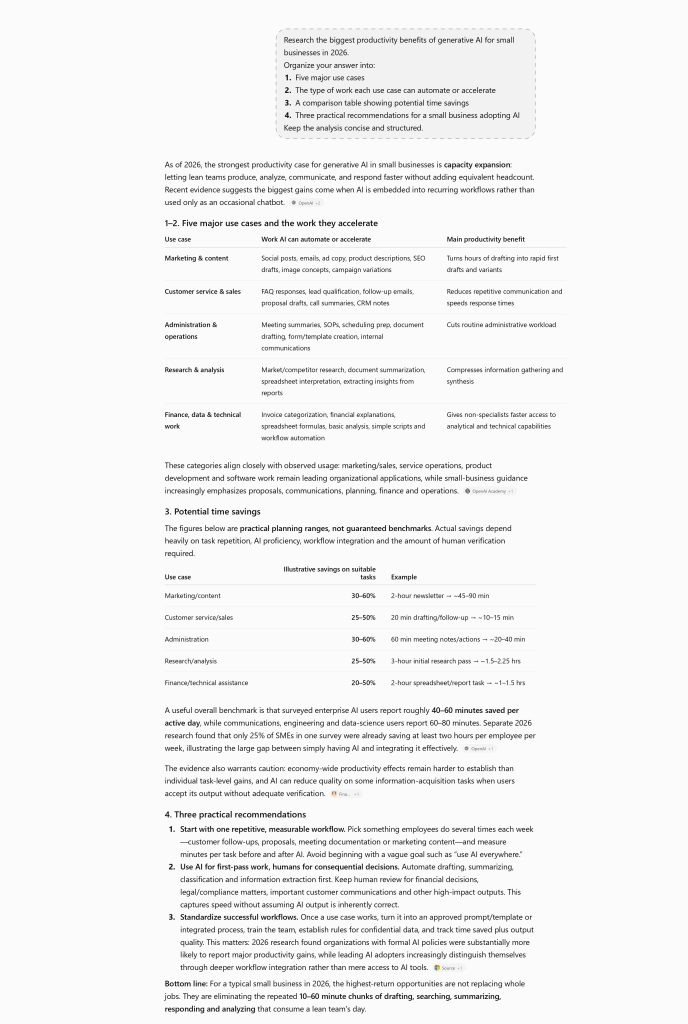
For example, you could upload a document and ask ChatGPT to summarize it. It could then identify important information, organize the findings into a table, and help draft a report. You can continue creating supporting material in the same conversation.
ChatGPT also includes web search and a deeper research capability. Deep research can perform multi-step investigations across online sources and uploaded files before producing structured reports with citations.
Projects can also keep related chats, files, instructions, and context together, which is useful for work that continues over time.
Where ChatGPT saves time
- Researching and summarizing information
- Drafting and rewriting content
- Analyzing PDFs and other documents
- Brainstorming ideas
- Writing and explaining code
- Creating tables and structured information
- Analyzing images and screenshots
- Generating and editing images
- Planning projects and workflows
Best for
Students, freelancers, developers, writers, researchers, marketers, business owners, and general users who want one AI assistant capable of handling many different tasks.
Limitation
Its versatility can also encourage people to use it for tasks where a specialist product may be better. Important factual information should still be checked against reliable sources.
Verdict: If you want only one general-purpose AI productivity tool, ChatGPT is one of the strongest places to start.
2. Gemini — Best for the Google Ecosystem
Gemini becomes particularly useful for people whose digital lives already revolve around Google.
Google has increasingly connected Gemini with its wider ecosystem and developed it beyond a conventional question-and-answer chatbot.
Gemini offers advanced research capabilities, multimodal interaction, and connections with Google services. For example, Google’s Deep Research systems can conduct longer investigations across the web and other sources. Newer versions can also generate visualizations from research.
Gemini has also expanded its ability to use information from connected Google services, although the availability of individual features can vary by country and subscription.
That integration can reduce one of the most repetitive parts of working with AI: manually transferring information between applications.
Where Gemini saves time
- Researching topics
- Summarizing information
- Working within Google’s ecosystem
- Analyzing documents and images
- Brainstorming and writing
- Handling multimodal prompts
- Organizing research
- Creating visual explanations
Best for
People who already rely heavily on Google products and want AI integrated more closely into that environment.
Limitation
Some of Gemini’s most advanced capabilities depend on the user’s subscription, account type, region, or connected services.
Verdict: Gemini is especially attractive when Google services are already at the center of your workflow.
3. Claude — Best for Writing and Detailed Analysis
Claude has become a major alternative to ChatGPT and Gemini, particularly for people working with writing, documents, coding, research, and complex analysis.
One of its practical strengths is the way it can work through substantial amounts of information while maintaining a coherent conversation.
As a result, Claude is useful for reviewing reports, rewriting drafts, and analyzing documents. It can also explain complicated material or help develop longer pieces of content.
Claude also offers Research capabilities that can perform multiple searches, investigate different parts of a question, and provide cited results. Its integrations can connect Claude with external sources and workplace information.
Where Claude saves time
- Editing long documents
- Summarizing complicated material
- Writing and rewriting
- Analyzing reports
- Researching complex subjects
- Coding and technical explanation
- Comparing documents or arguments
Best for
Writers, researchers, programmers, analysts, students, and professionals who regularly work with substantial amounts of text.
Limitation
Claude is highly capable as a general assistant, but users deeply invested in another company’s ecosystem may find competing tools more convenient for certain integrated workflows.
Verdict: Claude is a particularly strong choice for long-form writing, document work, research, and careful analysis.
4. Perplexity — Best for Fast Web Research
Perplexity approaches AI from a research-first perspective.
Instead of treating web search as an additional feature, searching and synthesizing online information are central to the product.
That makes it particularly useful when you want to investigate a topic and quickly see where the information came from.
Its Research mode performs repeated searches, reads numerous sources and synthesizes the findings into a report. Perplexity says its current research system can also work with uploaded documents and perform calculations and data analysis.
As a result, Perplexity can save considerable research time. Instead of opening many search results individually, you can use it to gather and organize the information more quickly.
Where Perplexity saves time
- Web research
- Finding sources
- Comparing products or services
- Researching current topics
- Creating research summaries
- Gathering background information
- Following citations to original material
Best for
Researchers, writers, journalists, students, marketers, and anyone who performs frequent online research.
Limitation
A citation does not automatically make an answer correct. The quality of the original source still matters, so important claims should be checked.
Verdict: For research-oriented web searching, Perplexity remains one of the most useful specialist AI tools.
5. NotebookLM — Best for Learning From Your Own Sources
NotebookLM solves a different problem.
Instead of asking AI about the entire internet, you can give it a collection of sources and use AI to understand that material.
This makes it useful for many types of source material. For example, you can use it with research papers, course materials, reports, interview transcripts, books, presentations, and notes.
NotebookLM can answer questions based on the sources inside a notebook and provide citations back to those materials.

Google has also expanded NotebookLM beyond text summaries. By 2026, it could create formats including Audio Overviews, Video Overviews, slide decks and info-graphics from source material.
Imagine having 15 reports that you need to understand before a meeting. Instead of repeatedly searching through every document, you can organize them into a notebook and interrogate the collection.
Where NotebookLM saves time
- Studying large collections of material
- Summarizing documents
- Comparing sources
- Preparing for exams or meetings
- Turning research into audio summaries
- Finding information buried inside source material
- Creating study aids and visual summaries
Best for
Students, researchers, teachers, journalists, analysts, and professionals working with large collections of documents.
Limitation
NotebookLM’s usefulness depends heavily on the quality of the material you provide. Google also warns that AI-generated outputs can contain inaccuracies.
Verdict: NotebookLM is one of the most interesting productivity tools for people who need to understand information rather than simply generate more of it.
6. GitHub Copilot — Best for Software Development
AI-assisted programming has evolved far beyond autocomplete.
GitHub Copilot can help developers write code, explain unfamiliar code, suggest changes and work through programming problems without constantly leaving their development environment.
More importantly, Copilot’s coding agent can handle delegated development work asynchronously.
GitHub describes the coding agent as capable of working in its own development environment, making changes, running tests and eventually returning a pull request for review.
That changes the productivity equation.
Instead of using AI only to suggest the next few lines of code, developers can increasingly delegate defined pieces of work and review the result afterward.
Where GitHub Copilot saves time
- Writing repetitive code
- Explaining unfamiliar code
- Generating tests
- Fixing bugs
- Refactoring
- Creating documentation
- Working through development tasks
- Preparing pull requests
Best for
Software developers and development teams.
Limitation
AI-generated code still requires human review. Developers still need to review the results carefully. They remain responsible for security, architecture, performance, licensing, and whether the generated code actually solves the problem.
Verdict: For developers, GitHub Copilot can remove substantial amounts of repetitive programming work while keeping AI close to the existing development workflow.
7. Canva — Best for Fast Visual Content Creation
Not everyone who needs professional-looking visual content is a professional designer.
That is the problem Canva has traditionally addressed, and AI has expanded what the platform can do.
Canva’s AI tools can help users move from an idea to editable visual content without building every element manually. Its Magic Studio brought multiple AI-assisted creation features into the same design environment.
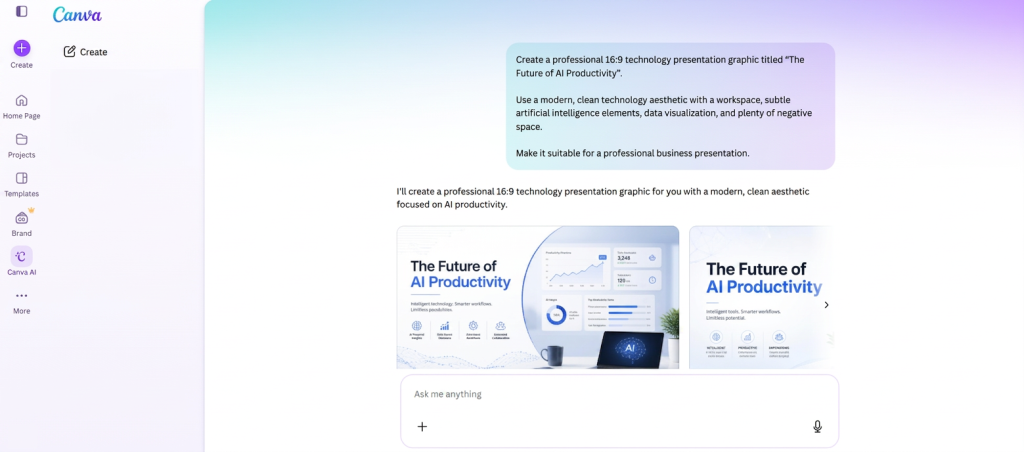
In 2026, Canva announced Canva AI 2.0. The system expands the platform toward conversational and agentic creation. It includes editable layered outputs and workflows involving research, scheduling, and other tasks. The new system was announced as a research preview, so availability may vary.
Where Canva saves time
- Social-media graphics
- Presentations
- YouTube thumbnails
- Posters and advertisements
- Marketing materials
- Simple image editing
- Rapid design variations
- Converting ideas into visual drafts
Best for
Content creators, small businesses, marketers, teachers, students, social-media managers, and non-designers.
Limitation
AI-generated designs still benefit from human judgment. Typography, spacing, brand consistency, factual accuracy and visual hierarchy should be checked before publication.
Verdict: Canva is one of the easiest ways for non-designers to incorporate AI into everyday visual-content production.
8. Grammarly — Best for Improving Everyday Writing
Writing productivity is not only about generating text faster.
Editing can consume just as much time.
Grammarly built its reputation around grammar, spelling, clarity and writing suggestions, but it has since expanded substantially into AI-assisted communication.
Its newer AI agents handle several specific writing tasks. These include proofreading, finding citations, paraphrasing, and predicting how readers may react to the text.
That makes Grammarly particularly useful for people who already have a draft and want help improving it rather than generating an entire document from nothing.
Where Grammarly saves time
- Proofreading
- Fixing grammar and spelling
- Rewriting awkward sentences
- Adjusting tone
- Improving clarity
- Checking citations and originality
- Polishing emails and reports
Best for
Writers, students, office workers, marketers, non-native English writers, and anyone who writes frequently for work.
Limitation
Automatic rewriting can sometimes make writing sound generic or remove deliberate stylistic choices. Suggestions should therefore be treated as recommendations rather than mandatory corrections.
Verdict: Grammarly is most valuable as an always-available editor, particularly for people who write throughout the day.
9. Notion AI — Best for AI Inside a Workspace
Notion AI becomes particularly interesting when your information already lives inside Notion.
Instead of copying notes, tasks and documents into an external chatbot, AI can operate closer to the workspace where that information is stored.
Notion AI now handles several types of workspace tasks. These include connected-app search, Research Mode, AI Meeting Notes, writing assistance, and database creation.
Its meeting feature can transcribe discussions and identify key points and action items, reducing the need to manually create meeting summaries.
Research Mode can also work across workspace information, connected applications and web sources to produce more detailed reports.
Where Notion AI saves time
- Finding information in a workspace
- Summarizing notes
- Creating project updates
- Drafting documents
- Organizing information
- Researching across multiple sources
- Producing meeting notes
- Creating and updating databases
Best for
Teams, project managers, businesses, researchers and individuals who already organize substantial amounts of work inside Notion.
Limitation
Its biggest advantage is also its biggest limitation: if you do not use Notion as a central workspace, much of the integration benefit disappears. Some AI capabilities are also restricted by plan.
Verdict: Notion AI makes the most sense when your workspace itself becomes the context for the AI.
10. ElevenLabs — Best for AI Voice and Audio Production
Audio production traditionally requires recording equipment, a suitable environment, multiple takes, editing and sometimes voice actors.
AI voice technology can reduce parts of that process dramatically.
ElevenLabs specializes in AI speech and voice technology. Its tools include text-to-speech, voice transformation and multilingual dubbing.
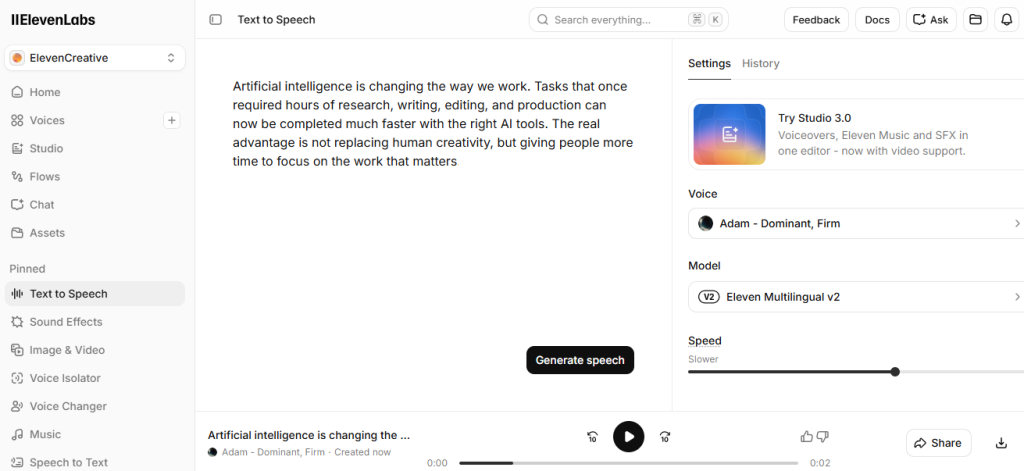
Voice Changer can transform a recorded performance into another voice while preserving aspects such as timing, pacing and delivery.
ElevenLabs has also expanded multilingual dubbing. Its Dubbing v2 system was introduced in 2026. It is designed to preserve elements of the original speaker’s performance while translating speech into more than 90 languages.
For content creators, that can turn what was once a substantial localization project into a much faster workflow.
Where ElevenLabs saves time
- Video narration
- Voiceovers
- Audiobooks
- Podcasts
- Multilingual dubbing
- Voice transformation
- Creating alternate-language versions of content
Best for
YouTubers, video creators, podcasters, educators, marketers, publishers and other people producing audio content.
Limitation
AI voice generation should be used responsibly. Creators should pay attention to consent, licensing, impersonation concerns and the rules of the platforms where the resulting audio will be published.
Verdict: ElevenLabs is one of the most useful specialist AI platforms when voice itself is part of the production process.
Which AI Tool Should You Choose?
The answer depends more on your workflow than on which company has the most powerful model.
If you want a general-purpose assistant, start with ChatGPT.
If most of your work takes place inside Google’s ecosystem, Gemini deserves serious consideration.
If your work involves substantial writing and document analysis, Claude is particularly strong.
For web-centered research, consider Perplexity.
For studying or interrogating your own collection of sources, NotebookLM is difficult to replace with a conventional chatbot.
Developers should consider GitHub Copilot, while people producing visual content can save significant time with Canva.
For writing improvement, Grammarly remains useful because it works directly on the editing stage.
Teams already using Notion can gain more from Notion AI than someone starting with an empty workspace.
And if your work requires narration, dubbing or synthetic speech, ElevenLabs provides capabilities that general-purpose assistants do not primarily focus on.
Do You Need All 10 AI Tools?
Probably not.
In fact, subscribing to too many AI services can create the opposite of productivity.
For example, you may spend more time learning different interfaces and moving information between platforms. You also have to track subscriptions and decide which tool to use.
A more practical strategy is to build a small AI toolkit.
For example, a content creator might use:
ChatGPT for research and planning → Canva for graphics → ElevenLabs for narration.
A developer might use:
ChatGPT or Claude for broader problem solving → GitHub Copilot while coding → Perplexity for web research.
A student or researcher might combine:
NotebookLM for course material → Perplexity for external research → Grammarly for final editing.
The goal is not to use the greatest number of AI products.
The goal is to eliminate unnecessary work.
Free vs Paid AI Tools: Should You Subscribe?
You do not necessarily need a paid subscription when you first start using AI.
Many platforms offer some form of free access, trial usage or limited functionality, although the exact limits and features change frequently.
Start with the free version where possible.
After using the tool for real work, ask a simple question:
Does this tool save enough time to justify its cost?
If an AI subscription saves several hours of productive work every month, paying for it may make sense.
If you use it twice and forget about it, it probably does not.
Avoid subscribing simply because a product is popular.
Can AI Tools Really Save Hours of Work?

Yes—but only when the task is appropriate.
AI is particularly effective at reducing repetitive information work. For example, it can summarize documents, produce first drafts, and search large collections of information. It can also transcribe meetings, create routine code, generate variations, and transform existing content into new formats.
The greatest productivity gains often come from combining human judgment with machine speed.
A human decides what should be accomplished.
AI helps reduce the time required to accomplish it.
The final responsibility still belongs to the person using the tool.
Frequently Asked Questions
What is the best AI productivity tool in 2026?
There is no single best tool for every task. ChatGPT is one of the strongest general-purpose choices, while specialist tools such as GitHub Copilot, NotebookLM, Canva and ElevenLabs may be better for particular workflows.
What is the best AI tool for research?
ChatGPT, Gemini, Claude and Perplexity all provide advanced research capabilities. Perplexity is particularly research-focused, while NotebookLM is highly useful when research needs to remain grounded in a specific collection of sources.
What is the best AI tool for coding?
GitHub Copilot is designed specifically for software-development workflows. General-purpose assistants such as ChatGPT and Claude can also be useful for coding, debugging and technical explanations.
What is the best AI tool for writing?
Claude, ChatGPT and Gemini can all generate and edit substantial amounts of text. Grammarly is particularly useful for proofreading and improving text that has already been written.
What is the best free AI tool?
That depends on the task. Several major AI platforms provide free access with varying limitations. Because pricing and usage limits change frequently, users should check each provider’s current plan before choosing based on price alone.
Will AI tools replace human workers?
AI can automate parts of many jobs, but using an AI tool is not the same as replacing an entire occupation. Most professional work involves judgment, responsibility, communication, domain knowledge and decision-making in addition to the individual tasks AI can accelerate.
Final Thoughts
The most important AI trend in 2026 is not simply that models are becoming more powerful.
AI is moving closer to the work itself.
Coding assistants are becoming agents, while research tools can investigate hundreds of sources. Meanwhile, workspace assistants can search organizational knowledge, and design tools can turn instructions into editable visual material. Voice systems can also translate and reproduce performances across languages.
That makes choosing the right workflow increasingly important.
You do not need ten AI subscriptions.
You need a small number of tools that remove genuine bottlenecks from your work.
Start with the task that consumes the most time, test the AI tool designed to solve it, and measure whether it actually improves your workflow.
Used that way, AI becomes more than an interesting technology.
It becomes a practical productivity tool.