


Artificial intelligence can be remarkably useful, but using AI does not have to mean paying for several monthly subscriptions. We will help you find out the best free AI tools in 2026.
In 2026, many leading AI platforms still provide free access to useful features. You can research topics, write and edit content, analyze documents, generate images, create designs, write code, study source material, improve your writing, and even produce AI-generated speech without immediately paying for a premium plan.
There is an important catch.
Free does not mean unlimited.
Most free AI tools impose restrictions such as daily or monthly usage limits, fewer premium models, limited credits, slower access during busy periods, or restrictions on advanced features.
Even with those limitations, free plans can be more than enough for students, freelancers, developers, content creators, small businesses, and people who simply want to experiment with AI before spending money.
Here are 15 of the best free AI tools you can use in 2026, what you can do with them, and where their free versions make the most sense. If productivity is your main priority, click 10 best AI productivity tools in 2026 for a closer look at tools designed to save time.
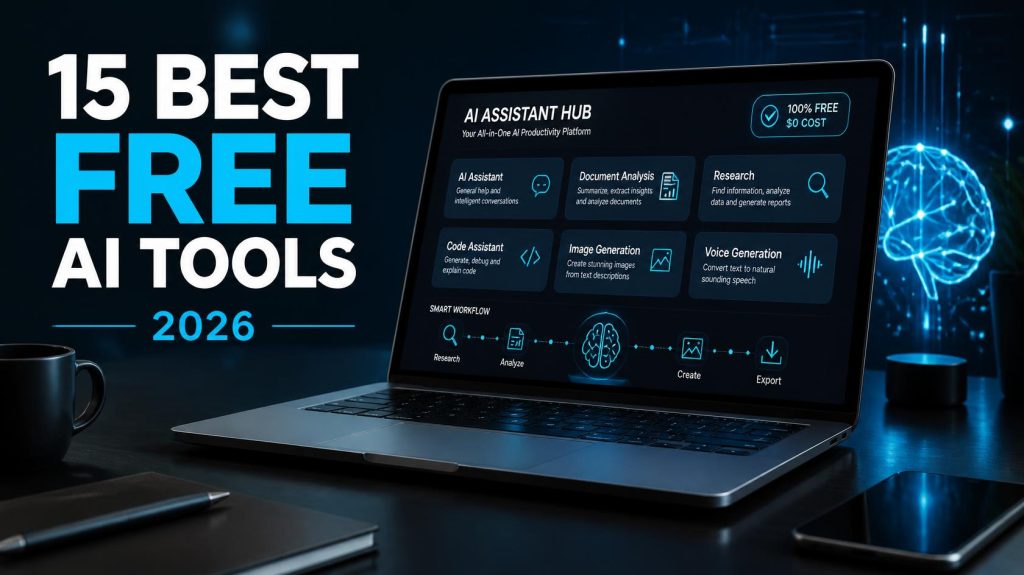
Quick Comparison: Best Free AI Tools in 2026
| AI Tool | Best For | Free Access | Main Limitation |
|---|---|---|---|
| ChatGPT | General AI assistance | Yes | Usage limits |
| Gemini | Google users | Yes | Compute-based limits |
| Claude | Writing and analysis | Yes | Usage limits |
| Perplexity | Web research | Yes | Advanced research limits |
| NotebookLM | Researching your own sources | Yes | Notebook and feature limits |
| Microsoft Copilot | Microsoft users | Yes | Some advanced features restricted |
| DeepSeek | Reasoning and general AI | Yes | Availability and feature limitations |
| Le Chat | Fast AI assistance | Yes | Premium features restricted |
| GitHub Copilot | Programming | Yes | Monthly coding limits |
| Canva | Design and visual content | Yes | Some AI tools require credits or paid access |
| Adobe Firefly | AI image creation | Yes | Generation limits |
| Grammarly | Writing improvement | Yes | Advanced features restricted |
| ElevenLabs | AI voice generation | Yes | Monthly credit allowance |
| HuggingChat | Experimenting with AI models | Yes | Model availability can vary |
| Elicit | Academic research | Yes | Advanced research features limited |
Free-plan features and limits can change. Always check the provider’s current plan before choosing a tool based primarily on price.
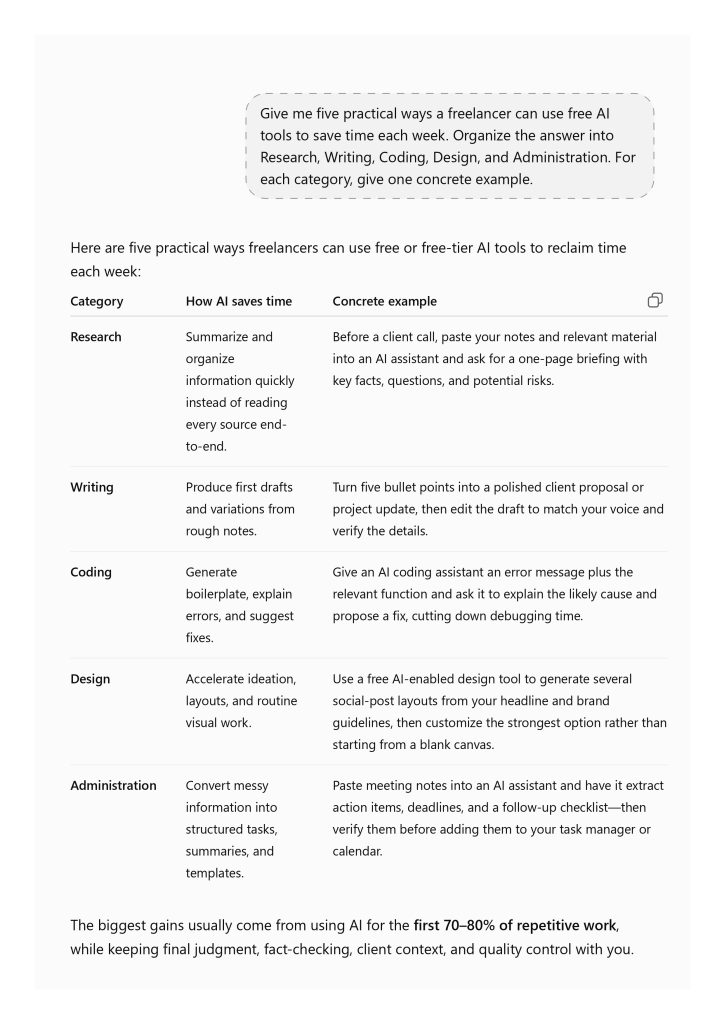
1. ChatGPT — Best Free All-Round AI Tool
ChatGPT is one of the easiest places to start if you want a single AI assistant capable of handling many different tasks.
The free version provides much more than basic text conversation. Depending on current usage limits, free users can search the web, upload files and images, analyze data, use GPT, generate images, and work with a range of general AI capabilities.
That makes ChatGPT useful for people who do not yet know which specialist AI tools they need.
For example, you can use it to explain a difficult subject, summarize a document, brainstorm ideas, rewrite an email, analyze a spreadsheet, help debug code, create a plan, or research information.
What you can do for free
- Ask general questions
- Research information
- Search the web
- Upload and analyze files
- Analyze images
- Get writing assistance
- Get coding help
- Perform limited data analysis
- Generate images within available limits
- Use available GPTs
Best for
Students, freelancers, writers, developers, researchers, business owners, and anyone who wants a flexible general-purpose AI assistant.
Free-plan limitation
Free accounts have lower usage limits than paid plans. Some tools, including file uploads, data analysis and image generation, can have their own separate limits.
Verdict: If you want to begin using AI without paying anything, ChatGPT remains one of the strongest general-purpose starting points.
2. Gemini — Best Free AI Tool for Google Users
Gemini is Google’s general-purpose AI assistant.
Its biggest advantage is not simply the underlying AI model. Gemini increasingly connects AI with Google’s wider ecosystem and can work with text, images, files, research tasks, and other forms of information.
Users without a paid Google AI plan still receive access to Gemini, although Google now applies usage limits based partly on computing requirements.
This means the exact amount of free usage may depend on the model, feature, prompt complexity, conversation length, and current capacity rather than a simple fixed number of daily prompts.
What you can do for free
Depending on availability and current limits, Gemini can help with:
- Writing and rewriting
- Brainstorming
- Summarizing information
- Analyzing files and images
- Research
- Coding assistance
- Connected Google applications
- Canvas
- Gems
- Multimodal prompts
Best for
People who already use Google products extensively and want an AI assistant that fits naturally into that ecosystem.
Free-plan limitation
Free usage is subject to standard compute-based limits. More demanding features can consume more capacity, and availability can change during periods of high demand.
Verdict: Gemini is one of the most compelling free ChatGPT alternatives, especially for people already working inside Google’s ecosystem.

3. Claude — Best Free AI for Writing and Analysis
Claude is particularly strong when the task involves reading, writing, reasoning, or analyzing substantial amounts of information.
It can help rewrite awkward passages, explain difficult ideas, summarize material, brainstorm, analyze documents, assist with programming, and develop longer pieces of writing.
Its conversational style also makes it useful when you want to develop an idea through several rounds rather than generate a single short answer.
What you can do for free
- Write and rewrite content
- Summarize information
- Analyze text and documents
- Brainstorm ideas
- Ask complex questions
- Get coding assistance
- Develop outlines and reports
- Compare arguments and information
Best for
Writers, researchers, programmers, students, analysts, and people who regularly work with substantial amounts of text.
Free-plan limitation
Free usage is limited, and the amount available can vary depending on demand and the complexity of your conversations. Paid plans provide higher limits and broader access to advanced capabilities.
Verdict: Claude is one of the best free choices for users whose work revolves around writing, documents, analysis, and thoughtful long-form conversations.
If you decide between the three assistants, read our article ChatGPT vs Gemini vs Claude comparison for 2026.
4. Perplexity — Best Free AI Tool for Web Research
Perplexity is designed around finding and synthesizing information from the web.
That makes it different from using a conventional chatbot and hoping its existing knowledge contains the answer.
When you research a subject, Perplexity can search for relevant information and provide citations that allow you to inspect the original sources.
This is especially useful when researching current events, products, companies, technology, statistics, or unfamiliar subjects.
What you can do for free
- Search the web with AI
- Ask follow-up research questions
- Find cited sources
- Summarize information
- Compare products and ideas
- Perform limited advanced searches
- Upload files within available limits
Best for
Researchers, students, journalists, writers, marketers, shoppers, and anyone who frequently searches the web.
Free-plan limitation
The free Standard plan provides basic search capabilities, but advanced research, premium models, file handling, and other features have tighter limits than paid plans.
Verdict: If your main reason for using AI is finding information online quickly, Perplexity deserves a place in your free toolkit.
5. NotebookLM — Best Free AI for Your Own Sources
NotebookLM takes a different approach from general AI assistants.
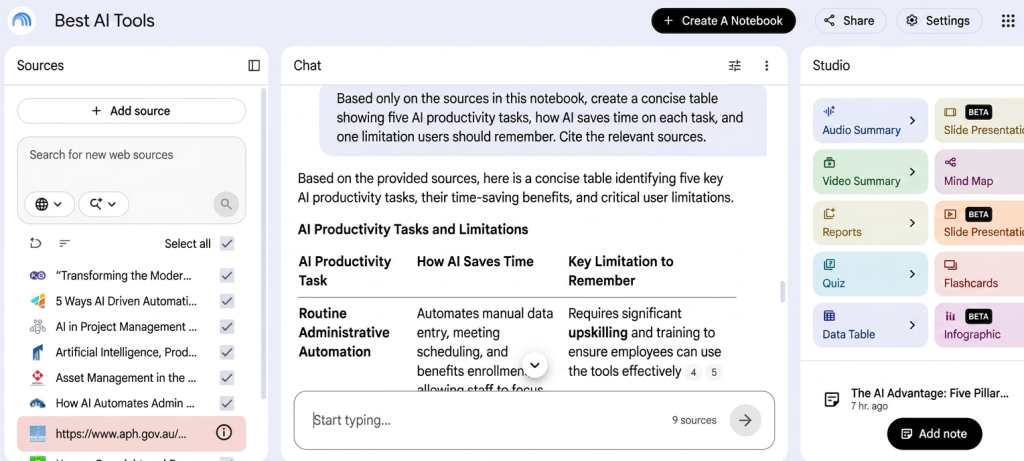
Instead of primarily asking questions about the wider internet, you create notebooks containing your own sources. You can then use AI to understand and explore that material.
Sources can include documents, websites, notes, research material, and other supported formats.
NotebookLM can answer questions about your sources and provide citations that point back to the relevant material.
This makes it especially useful when accuracy to a particular collection of documents matters.
It can also transform source material into other formats, including study aids and audio-style overviews, subject to current usage limits.
What you can do for free
- Create notebooks
- Add multiple sources
- Ask questions about source material
- Generate source-grounded summaries
- Find information inside documents
- Compare sources
- Create study material
- Generate limited Audio Overviews and other outputs
Best for
Students, researchers, teachers, journalists, analysts, and professionals working with collections of documents.
Free-plan limitation
The standard version has limits on notebooks, sources, daily interactions, and generated outputs. Higher Google AI plans increase those allowances.
Verdict: NotebookLM is one of the best free AI tools available when you want AI to work from information you provide rather than the open-ended knowledge of a conventional chat-bot.
6. Microsoft Copilot — Best Free AI for Microsoft Users
Microsoft Copilot provides another major entry point into generative AI.
Its consumer-facing tools can assist with research, writing, brainstorming, summarization, questions, and other everyday tasks.
For people already using Windows, Edge, Bing, or other Microsoft products, Copilot can be convenient because AI is increasingly integrated into Microsoft’s broader software ecosystem.
What you can do for free
Depending on the current product and region, free Copilot access can help with:
- General AI questions
- Web-assisted research
- Writing
- Summarization
- Brainstorming
- Image-related tasks
- Everyday planning and problem solving
Best for
Windows and Microsoft users who want convenient general-purpose AI assistance.
Free-plan limitation
Microsoft frequently changes which advanced Copilot capabilities are included in free and paid products. Some deeper research, Microsoft 365 integration, and premium functionality may require a subscription.
Verdict: Copilot is worth trying if Microsoft products already form a major part of your daily workflow.
7. DeepSeek — Best Free Alternative for Reasoning
DeepSeek attracted enormous attention by demonstrating that powerful AI reasoning did not necessarily have to be locked behind expensive subscriptions.
Its consumer chatbot provides a straightforward interface for asking questions, solving problems, writing, coding, reasoning, and analyzing information.
For users interested in testing alternatives to the major American AI platforms, it offers another capable option.
What you can do for free
- Ask general questions
- Solve reasoning problems
- Write and rewrite text
- Summarize information
- Get coding help
- Brainstorm
- Work through mathematical and technical problems
Best for
Students, developers, technically curious users, and people who want to compare different AI models without immediately paying for subscriptions.
Free-plan limitation
Availability, speed, model access, and individual features can change. Users should also consider their own privacy and data-handling requirements when choosing any cloud-based AI service.
Verdict: DeepSeek is useful as a free alternative, particularly for reasoning and technical tasks.
8. Mistral Vibe — Best Free Fast AI Assistant
Mistral Vibe is another strong alternative to the largest mainstream chat-bots.
Mistral has focused heavily on efficient AI models, and Vibe provides a consumer-friendly way to interact with its technology.
It can handle everyday questions, writing, summarization, reasoning, research-oriented tasks, and other forms of AI assistance.
What you can do for free
- Ask general questions
- Write and edit text
- Summarize information
- Brainstorm ideas
- Analyze information
- Get technical assistance
- Experiment with Mistral’s AI models
Best for
Users looking for a fast alternative to ChatGPT, Gemini, and Claude.
Free-plan limitation
Advanced features and higher usage levels may require a paid plan. Available models and limits can also change as Mistral updates the service.
Verdict:Vibe is worth testing if you want another capable free AI assistant rather than depending entirely on one provider.
9. GitHub Copilot — Best Free AI Coding Tool
GitHub Copilot is designed specifically for software development.
Unlike a general chatbot that happens to understand programming, Copilot can work closer to the developer’s actual coding environment.
It can suggest code, explain programming concepts, help fix bugs, generate tests, and assist with repetitive development tasks.
GitHub also offers a free Copilot tier, making it possible for individual developers to experiment with AI-assisted coding without immediately subscribing.
What you can do for free
The free plan provides limited monthly access to features such as:
- AI code completions
- Copilot Chat
- Code explanations
- Programming assistance
- Debugging help
- Code generation
Best for
Students learning programming, hobby developers, and programmers who want to test AI-assisted development.
Free-plan limitation
Copilot Free has monthly limits. Heavy developers are likely to reach those limits much faster than occasional users.
Verdict: For programming specifically, GitHub Copilot Free is more useful than forcing a general-purpose chatbot to replace a dedicated development assistant.
10. Canva — Best Free AI-Assisted Design Tool
Canva has long been useful for people who need visual content but do not have professional design skills.
AI has expanded that advantage.
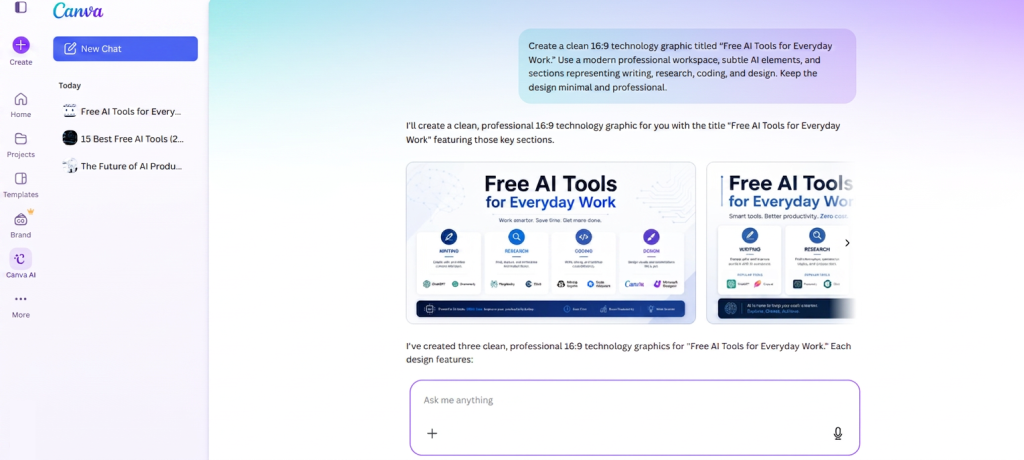
Canva now combines traditional templates and editing tools with AI-assisted creation. Depending on the feature and account, users can generate or modify visual content, develop design ideas, work with text, and accelerate common creative tasks.
The result is particularly useful for people creating online content.
What you can do for free
Canva’s free plan provides access to a large collection of design features, while some AI tools provide limited free usage.
You can use Canva for:
- Social-media graphics
- Presentations
- YouTube thumbnails
- Posters
- Simple image editing
- Documents
- Design templates
- Limited AI-assisted creation
Best for
YouTubers, bloggers, social-media managers, students, teachers, marketers, and small businesses.
Free-plan limitation
Not every Canva AI capability is unlimited or included in the free plan. Premium templates, assets, AI features, and higher usage levels can require Canva Pro or another paid plan.
Verdict: Canva is one of the best free starting points for people who want AI assistance combined with a full visual-design environment.
11. Adobe Firefly — Best Free AI Tool for Generative Images
Adobe Firefly brings generative AI into Adobe’s creative ecosystem.
It can generate images from text prompts and assist with other generative visual tasks. Adobe has also continued expanding Firefly into areas such as video and audio.
For someone who wants to experiment with generative media without immediately buying professional creative software, the free access provides a useful entry point.
What you can do for free
Depending on current availability and generation allowances, Firefly can provide access to:
- Text-to-image generation
- Generative visual effects
- Image editing
- Creative experimentation
- Limited video or other generative-media features
Best for
Designers, marketers, bloggers, content creators, and people experimenting with AI-generated visual media.
Free-plan limitation
Free generations are limited. More intensive use and premium generative features require paid credits or plans.
Verdict: Adobe Firefly is worth testing when your AI workflow is primarily visual rather than text-based.
12. Grammarly — Best Free AI Tool for Improving Writing
Not every AI tool needs to generate an entire article.
Sometimes the more useful application is improving something you have already written.
Grammarly can identify spelling, grammar, punctuation, and clarity problems while you write. Its broader AI features can also assist with rewriting and communication tasks, although advanced capabilities are more restricted on free accounts.
That makes Grammarly useful because it works at the editing stage of the writing process.
What you can do for free
- Correct grammar
- Fix spelling
- Improve punctuation
- Identify basic writing problems
- Review tone
- Access limited AI-assisted writing features
Best for
Students, professionals, writers, non-native English speakers, office workers, and anyone who sends a lot of written communication.
Free-plan limitation
Advanced rewriting, style guidance, and higher AI usage require paid access.
Verdict: Grammarly Free is useful when you already know what you want to say but want help making the final writing cleaner.
13. ElevenLabs — Best Free AI Voice Generator
AI is not limited to text and images.
ElevenLabs specializes in synthetic speech and voice technology. You can enter text, select a voice, and generate spoken audio without recording the narration yourself.
This can dramatically reduce the time required to produce voice-overs for videos, demonstrations, educational material, prototypes, and other audio content.
The platform also provides more advanced voice and dubbing capabilities, although those features can have different restrictions.
What you can do for free
Within the current free credit allowance, users can experiment with:
- Text-to-speech
- AI-generated narration
- Different voices
- Multilingual speech
- Limited audio-generation workflows
Best for
YouTubers, video creators, educators, podcasters, marketers, and anyone experimenting with AI narration.
Free-plan limitation
The free plan provides a limited credit allowance. Longer narration projects can consume those credits quickly, and some advanced or commercial-use requirements may depend on the selected plan and current licensing terms.
Verdict: ElevenLabs is one of the easiest ways to experience how much time AI can save in audio production.
14. HuggingChat — Best for Experimenting With Open AI Models
HuggingChat is one of the most important platforms in the open AI ecosystem.
HuggingChat provides free access to open-source AI models, although usage limits may apply.
This makes it useful for technically curious users who want to explore alternatives to proprietary AI assistants.
Instead of treating one company’s model as the only option, you can experiment with different approaches and see how results vary.
What you can do for free
Depending on current model availability, HuggingChat can be useful for:
- General AI conversation
- Writing
- Summarization
- Brainstorming
- Coding questions
- Testing different models
- Exploring open AI technology
Best for
Developers, AI enthusiasts, students, researchers, and users interested in open models.
Free-plan limitation
The experience can be less predictable than mainstream commercial assistants. Available models, speed, capabilities, and limits can change.
Verdict: HuggingChat is especially valuable for users who want to explore the broader AI ecosystem rather than rely exclusively on major commercial platforms.
15. Elicit — Best Free AI Tool for Academic Research
General-purpose AI assistants are useful for research, but academic research has different requirements.
Elicit is designed specifically to help researchers work with scientific literature.
It can help find relevant papers, organize information, compare research findings, and reduce some of the repetitive work involved in literature reviews.
That specialization makes it more appropriate for academic research than asking a general chatbot to improvise a list of papers.
What you can do for free
Depending on current plan limits, Elicit can help with:
- Finding research papers
- Exploring academic questions
- Summarizing papers
- Comparing research
- Extracting useful information
- Organizing literature research
Best for
University students, academics, researchers, analysts, and anyone working seriously with scientific literature.
Free-plan limitation
More extensive systematic-review workflows, larger research projects, and advanced functionality may require paid access.
Verdict: Elicit is one of the most useful specialist AI tools to try if your work involves academic literature.
Which Free AI Tool Should You Choose?
You probably do not need all 15.
The best approach is to choose tools based on the work you actually perform.
If you want one general AI assistant, start with ChatGPT, Gemini, or Claude.
If your priority is web research, try Perplexity.
If you need to understand your own documents and sources, NotebookLM is a better fit.
Developers should try GitHub Copilot, while content creators can combine Canva with ElevenLabs.
For visual generation, Adobe Firefly is worth testing.
Writers who already have drafts may get more practical value from Grammarly than from another chatbot.
Academic researchers should consider Elicit, while technically curious users can explore HuggingChat, DeepSeek, and Le Chat.
The point is not to create accounts on every AI platform.
It is to find the smallest collection of tools that solves your actual problems.
Can You Build a Complete AI Toolkit for Free?
Yes.
A surprisingly capable workflow can be created without paying for several subscriptions.
For example, a content creator could use:
ChatGPT for ideas and planning → Perplexity for web research → Canva for graphics → ElevenLabs for limited voice generation.
A student could use:
Gemini or ChatGPT for explanations → NotebookLM for course material → Elicit for academic research → Grammarly for final editing.
A developer could use:
Claude or ChatGPT for broader technical questions → GitHub Copilot Free while programming → Perplexity for finding current documentation and technical information.
Each individual service has limitations.
Together, however, several free plans can cover a remarkably wide range of tasks.
What Does “Free AI Tool” Actually Mean?
This is an important distinction.
A free AI tool does not necessarily provide unlimited access to everything the company offers.
Free AI services generally use one or more of the following restrictions:
Usage limits
You may receive only a certain amount of AI usage within a particular period.
Credit systems
Image, video, or audio generation may consume credits.
Model restrictions
The company’s most advanced models may be reserved for paying customers or have tighter free limits.
Feature restrictions
Research agents, larger context windows, premium voices, advanced image tools, integrations, or other capabilities may require payment.
Capacity restrictions
Free users may receive reduced access when demand is unusually high.
For this reason, avoid choosing an AI platform solely because someone describes it as “free.”
Ask a better question:
Does the free version provide enough functionality for what I actually need?
Free AI vs Paid AI: When Should You Upgrade?
Start free.
There is usually little reason to subscribe before you understand how a tool fits into your workflow.
Use the free version for real tasks rather than simply experimenting with random prompts.
After several days or weeks, ask yourself:
Am I regularly reaching the free limit?
Does this tool save meaningful amounts of time?
Would the paid features solve a real problem?
Could another free tool accomplish the same task?
If you rarely reach the limits, keep using the free plan.
However, if a tool consistently saves several hours of productive work every month, paying for higher limits may become economically reasonable.
The important thing is to pay for utility, not hype.
Are Free AI Tools Safe?
Free does not automatically mean unsafe, and paid does not automatically mean private.
Every cloud-based AI service has its own policies for accounts, data storage, model improvement, privacy, and enterprise controls.
Before uploading sensitive information, check the provider’s current privacy and data-handling policies.
Be particularly careful with:
- Confidential business documents
- Personal identification information
- Financial records
- Private client information
- Unreleased intellectual property
- Passwords or authentication credentials
- Sensitive workplace data
For ordinary brainstorming or public information, this may not be a major concern.
For confidential work, it matters considerably.
Frequently Asked Questions
What is the best free AI tool in 2026?
There is no universal winner, but ChatGPT is one of the strongest general-purpose options because its free plan covers many different tasks. Gemini and Claude are also strong alternatives.
What is the best free AI tool for research?
Perplexity is particularly useful for web research because it emphasizes searching and citing online sources. NotebookLM is better when you want AI to answer questions from a collection of sources that you provide.
What is the best free AI tool for students?
ChatGPT, Gemini, NotebookLM, Perplexity, Grammarly, and Elicit can all be useful to students for different purposes. NotebookLM is particularly useful for studying from course materials and other supplied sources.
What is the best free AI tool for coding?
GitHub Copilot Free is designed specifically for programming workflows. ChatGPT, Claude, Gemini, DeepSeek, and other general assistants can also provide coding help.
What is the best free AI image generator?
Adobe Firefly, ChatGPT, Gemini, Canva, and other platforms provide different forms of limited free image or design generation. Limits and availability can change frequently.
What is the best free AI tool for writing?
Claude, ChatGPT, and Gemini are strong general writing assistants. Grammarly is particularly useful for editing and improving text you have already written.
Can I use AI without a credit card?
Many of the services in this article provide free account access without requiring you to begin a paid subscription. Account and regional requirements vary by provider.
Are free AI tools unlimited?
Usually not. Most free AI plans use rate limits, credits, restricted premium features, or lower usage allowances than their paid plans.
Final Thoughts
You do not need an expensive collection of AI subscriptions to benefit from artificial intelligence in 2026.
Free AI tools have become capable enough to handle a substantial amount of everyday work.
The key is choosing them strategically.
Use a general assistant for broad tasks. Add a research tool when you need reliable sources. Choose a specialist product when you need coding, design, academic research, or voice generation.
Most importantly, do not subscribe to an AI service simply because everyone else is talking about it.
Start with the free plan.
Give the tool a real task.
Measure whether it saves time or improves the result.
Only then decide whether paying for additional capabilities is worthwhile.
The best AI toolkit is not the one with the most subscriptions.
It is the one that helps you accomplish more with fewer tools.

